Computers, Tablets & Accessories / PRODUCT GUIDE
Cable Matters 25-foot Cat6 guide: plan the route before upgrading the connection
The black 160001BLK25 is an indoor Ethernet patch cable for a computer, console or other device that can reach a router or switch. Its practical value starts with the route and the ports at each end, rather than the biggest speed printed in a listing.
As an Amazon Associate I earn from qualifying purchases.
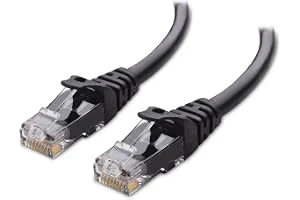
View Cable Matters 25 ft Cat 6 Ethernet cable (Black) on Amazon (paid link) ↗
Measure the route you will actually use
Run a string along the intended wall route, including corners and the distance from the wall to each socket. Leave enough slack to move the device without pulling on its port. A straight line across the room can underestimate a tidy route around furniture. Conversely, a large surplus coil behind a laptop is awkward if a shorter lead would reach comfortably. The exact linked model is 25 feet long; choose that length because it fits your layout, rather than buying extra cable as a supposed performance upgrade.
Match the cable to the ports you have
Cable Matters specifies 24 AWG bare copper, unshielded construction and snagless RJ45 connectors for its 160001 family. This connects Ethernet ports; it does not add one to a laptop. Inspect the computer, dock and router first. A USB-C-only laptop needs a suitable Ethernet adapter or dock, and that device becomes part of the connection. Write down each port’s documented speed before interpreting the cable’s advertised support for up to 10 Gbps. A faster-rated cable cannot make a slower port negotiate a faster link.
Separate local transfers from internet downloads
Copying a file to network storage and downloading from a remote service exercise different parts of the system. A cable change cannot increase your internet service tier. If inconsistent Wi-Fi is the reason for buying, compare the same task before and after connecting, under similar conditions. Confirm that the wired connection is being used and check the operating system’s link status. For local transfers, consider the storage and both computers as well as the network. Ryan has not benchmarked this cable or measured its effect on gaming latency; the useful promise is a physical connection, not a guaranteed speed-test result.
Give the indoor patch lead an accessible route
The manufacturer identifies this cable as intended for indoor use. Do not select it for an exposed outdoor run or direct burial. Snagless boots protect the latch during handling, but still leave room to reach and press the connector when unplugging it. Avoid trapping the lead beneath furniture or forcing an abrupt bend immediately behind a plug. A permanent building installation needs its own cable and installation assessment. For a desk or console, the tradeoff is straightforward: a wire can solve a wireless-placement problem while adding something you must route and accommodate.
Compare StarTech for a documented same-length Cat6 alternative
StarTech N6PATCH25BK is also a black 25-foot unshielded Cat6 patch cable with 24 AWG copper conductors and snagless connectors. Its official datasheet lists individual testing to the Category 6 standard and a lifetime warranty. That makes it a close comparison when you want a clearly identified replacement part and written support terms. Compare the delivered price and seller for that exact model. There is no measured speed advantage established here; do not choose between these two solely by treating their advertised MHz figures as internet-download speeds.
Compare shielded Cat6A when the installation calls for it
Cable Matters 160012 is a different family: shielded Cat6A with shielded RJ45 connectors. Consider its black 25-foot option when your network plan specifically calls for shielded cable, rather than assuming every home desk benefits from the change. The manufacturer describes the shielding as reducing interference and crosstalk. It does not remove limits imposed by ports, storage or the internet service. For an ordinary indoor connection with no shielding requirement, the simpler 160001 remains the relevant starting comparison. The Amazon alternative links are model searches; confirm the length, color and single-cable quantity before ordering.
Compare the shopping options
StarTech N6PATCH25BK — same-length unshielded Cat6
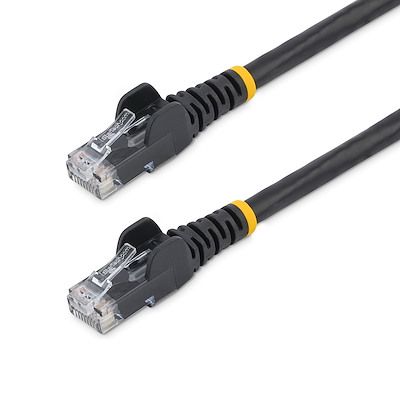
Product photo: StarTech official datasheet product photo
Cable Matters 160012 — shielded Cat6A; select 25 feet
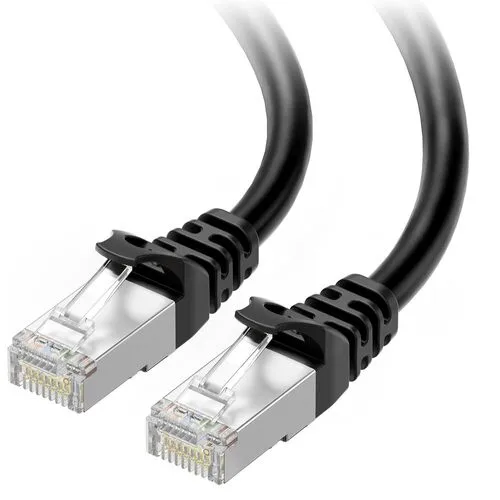
Product photo: Cable Matters official product photo
Sources and review basis
Researched November 20, 2026. Ryan’s own experience is attributed where supplied. Other judgments are buying advice based on the cited product information, not a hands-on comparison or laboratory test. Prices and availability are checked at the retailer.
- Cable Matters official 160001 construction, compatibility and indoor use
- Exact 160001BLK25 and B007NZGPAY model reference
- Office Depot exact 25-foot black model listing
- StarTech N6PATCH25BK official specifications and warranty
- Cable Matters official shielded Cat6A 160012 alternative
- Product photo: StarTech N6PATCH25BK — same-length unshielded Cat6
- Product photo: Cable Matters 160012 — shielded Cat6A; select 25 feet